Posts

Showing posts with the label basic

How to create a WIFI WLAN Hotspot in your Laptop.
Image
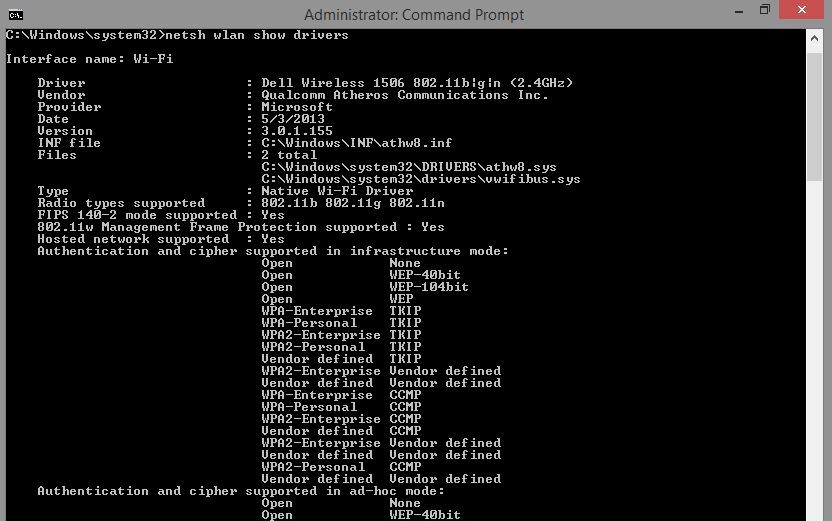
Sometime we wanna create a wifi hotspot while we have connected a donggle or wired broadband connection. We use some third party software like virtual hotspot. But here we  DON'T NEED ANY THIRD PARTY SOFTWARES. Screenshots: The command window In mobile show - Wifi hotspot successfully created In mobile - Entering the password In mobile shows - Connected to your PC. The commands: We have to run the cmd as a administration. First check weather wlan drivers are available on your pc or not. C:\Windows\system32> netsh wlan show drivers Now we configure the hotspot. We will give the username and password C:\Windows\system32> netsh wlan set hostednetwork mode=allow ssid=Tejas-PC key=dubaramatpuchna Now we on the hostednetwork or hotspot . C:\Windows\system32> netsh wlan start hostednetwork After using the wifi to turn off the hotspot give command. C:\Windows\system32> netsh wlan stop hostednetwork C:\Windows\system32...
How to make your Pendrive Bootable.

Image
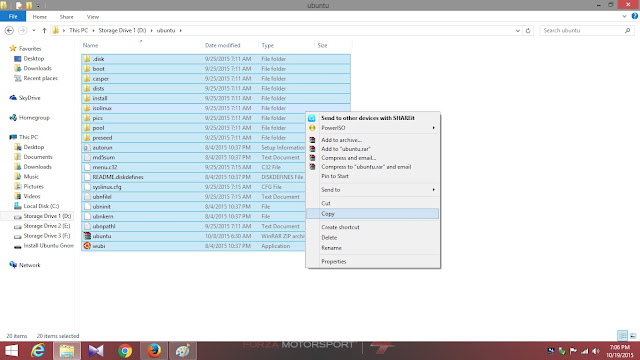
We all have done, installed operating systems using ordinary CD and DVD, and we also have done using Bootable Pendrives somewhere. But here we'll see how make a Pendrive to a Bootable Pendrive without using any third party software. DOS give the power to make your Pendrive Bootable using some commands . Screenshots: Copy all the required files from the folder where you've stored the OS Files and paste in the Pendrive. See here the removable Pendrive is Bootable now. DOS Commands: Open the command window as Administration. First we have to use the Diskpart command.   diskpart Now we can see all the volumes by using list disk command list disk Now we have to select the disk where we have to paste all the OS Files select disk x Where x = 1,2,3 (Your disk number which one you want to make bootable) Now we clean the disk clean Now we have to create a primary partition and Active the disk . create primary partition create partition primary...

Matrix multiplication using two dynamically allocated array

Image
This post will guide you to create a program which can accept two matrix according to the given number of rows and column. The arrays are dynamically initialized and then allocated memory. Screenshots [Demo] : The Code: #include<stdio.h> main() { int **pa1,**pa2,i,j,r,c,k,s=0; printf("Enter the number of rows: -->"); scanf ("%d",&r); printf("Enter the number of columns: -->"); scanf ("%d",&c); // Dynamically allocating the rows of first array pa1 pa1=(int **)malloc(r*sizeof(int *)); // Dynamically allocating the rows of Second array pa2 pa2=(int **)malloc(r*sizeof(int *)); for(i=0;i<c;i++) { // Dynamically allocationg the columns of the first array pa1 pa1[i]=(int *)malloc(c*sizeof(int)); // Dynamically allocationg the columns of the second array pa2 pa2[i]=(int *)malloc(c*sizeof(int)); } printf("Give The Data Of First Dynamically allocated array :\n"); for(i=0;i<r;i++) { ...

Python program to find the binary equivalent of any decimal

Image
This is a simple program in python to find the binary equivalent of any given decimal base number. This basically takes input as a decimal base number and coverts it into binary base and prints it. Sample Outputs: The Code: def bin(x): b="" if(x==0): #The Binary equivalent of decimal 0 is 0 b=str(0) while(x>0): b=b+str(x%2) #Typecasting an Integer to String x=x/2 b=b[::-1] #Reverse the String print b inp=input() bin(inp) Description: firstly input is taken from the keyboard and stored in inp variable. Then this variable is passed to bin() from where operations are performed and the result is then concatenated in a null string. The concatenation is done by type casting the integer to string i.e. str(x%2) and finally the string b is reversed and then displayed in the console. If helpful, share the code :)

Binary Search Iterative method in python

Image
This is an iterative method for the binary search algorithm. It takes a list as an input and another variable which is the data to be searched, and then passes them to the bin() function. And in bin() there is a single while loop. Screenshots/ Output : The Code def bin(x,y): l=0; h=len(x)-1; while(l<=h): mid=(l+h)/2 if(x[mid]<y): l=mid+1 elif(x[mid]>y): h=mid-1 elif(x[mid]==y): print "found " break; else: print "Not Found " x=input() y=input() bin(x,y);

Create a simple chatroom system in php without databases

Image
In this post, you will be guided to create a simple chatroom system in php without any databases. This system will create a folder for each chatroom and will store data in a simple .txt file, which is later accessed from the server side to display the conversations in the chatroom. This chatroom is flexible and light weight, it automatically reloads itself in 10 seconds so that new information is fetched correctly. The complete system is based on just a single php file in which file handling is used to retrieve and store the conversations from the chatroom. Demo: The index page when you start a coversation The conversation section of the index page Lets have some look on the major sections of the code To ask details when someone visits the page for the first time if (isset($_GET['enSubmit']) && isset($_GET['uname']) && isset($_GET['rname'])){ echo'<meta http-equiv="refresh" content="10">'; ...

Create a Simple Color Picker Android App [Seekbar Support]

Image
This post will let you create a simple Color picker android application which will return the HEX code from the values set by R,G, and B labeled seekbars. In this application you can not only get the HEX value of the color generated but you can also set the color as the application background. This app is created by 3 seekbars and 1 EditText and 2 buttons. The value of the seekbars are extracted form the  getProgress() method. and the obtained values from R,G, and B are converted to hex using  toHexString() method and finally they are concatenated together for the HEX code of the RGB. Demo: The Hex Code generated when tapped on the generate Button The Background Color changes with corresponding value of Hex code when tapped on Set It  Lets have a glimpse on the basic concepts of the MainActivity.java Fetching values from the Seekbars r=sb1.getProgress(); g=sb2.getProgress(); b=sb3.getProgress(); Setting the value of the Hex Code box from ...

Create a simple app which reads out what you write

Image
In this post you will be guided to create a simple android application which reads out loud the text you write. This application uses Text To Speech (TTS) class. This is a basic application which has 1 EditText field and a single button. The EditText field is basically takes input and once you tap that button, it will read the entered text. This program uses your default TTS output voice. Demo: When tapped on Speak, It reads loudly "Hello I'm Sid". Implementing TTS Class: public class MainActivity extends Activity implements TextToSpeech.OnInitListener Overriding TTS onInit method: @Override public void onInit(int status) { if (status == TextToSpeech.SUCCESS) { int result = tts.setLanguage(Locale.US); if (result == TextToSpeech.LANG_MISSING_DATA || result == TextToSpeech.LANG_NOT_SUPPORTED) { Log.e("TTS", "This Language is not supported"); } else { buttonSpeak.setEnabled(tru...

Palindrome checker which accepts both string and numbers

Image
This is a simple program in Python which accepts both string and integer and checks if it is palindrome. Basically this program coverts any input to a string and then performs a reverse string operation. There are two Functions used in this program, firstly  rev_str(), which reverse the string passed to it and secondly  palstr() which checks whether the string is palindrome. Here is the code Snippet def rev_str(x): return x[::-1] def palstr(x): if ( x == rev_str(x)): print "Palindrome"; else: print "Not palindrome"; str=raw_input(); palstr(str); Output: Well found bugs, feel free to report them !

Sum of digits in a number

The below program takes a number as input produces the sum of digits in the input number. The below program is implemented using c. Ex: Let 856 be number. So the sum of digits of 856 will be 8+5+6=19  #include<stdio.h> int main() { int x,k,sum=0,c; printf("\nEnter a number : "); scanf("%d",&x); while(x>0) { c=x%10; x=x/10; sum=sum+c; } printf("Sum of digits=%d",sum); return 0; } Description: The above program computes the sum of individual digits of a number and prints it. Output: Case 1: Enter a number:647 Sum of digits:17 Case 2: Enter a number:78 Sum of digits:15

Check whether a number is Armstrong

This program takes an input from the user in the console window and checks if the entered number is an armstrong number. A number is said to be an Armstrong number if and only if the sum of the cubes of each individual digit in that number equals to that number.This program is done in python. def arm(x): m=x; s=0; while (m>0): r=m%10; s=s+r*r*r; m=m/10; if(s==x): print x print " Is An Armstrong Number"; else: print x print " Is Not An Armstrong Number"; x=input(); arm(x); Description: The arm(x) performs operations on the user input x, then it displays the output according to the result achived. r is a variable which stores the last digit of x and s is a variable which stores the sum of the cubes of the digits. Then after the termanating condition, the while loop stops and a condition is used to check whether the variable s is equal to the input.

Number of squares present between two numbers

The following program prints the number of squares present between two numbers.The program is implemented using C++ language. Ex: Let the two numbers be 3 and 9. There are two squares between them i.e. 4 and 9.So the output will be 2. #include<iostream> #include<math.h> using namespace std; int main() { int x,y; cout<<"Enter two elements : "<<endl; cin>>x>>y; x=sqrt(x-1); y=sqrt(y); cout<<"\nThe number of squares present : "<<(y-x); return 0; } Description :  In the above program let the two elements be A and B. x is the square root of A and y is the square root of B. The squares of x and y lies in between A and B. Therefore square of elements present between x and y are also present in the range of A and b. Ex: 5 and 20 are two elements for the program. x=sqrt(5-1)=2 and y=sqrt(20)=4 According to program the count will be 2.9 and 16 are only two square elements present betw...

Fibonacci Series using the recursive method

The following program prints the Fibonacci series.This program is implemented using recursive method. The Fibonacci series is a series of numbers in which the current number is the sum of two previous Fibonacci numbers. This program is coded using the C language. Ex: 0,1,1,2,3,5,8,13.... #include<stdio.h> int main() { int n,i; printf("Enter the number of terms : "); scanf("%d",&n); printf("\nThe Fibonacci series is :\n"); for (i=0;i<=n;i++) printf("%d ", Fibonacci(i)); return 0; } int Fibonacci(int n) { if(n==0) return 0; else if(n==1) return 1; else return(Fibonacci(n-1)+Fibonacci(n-2)); } Description: The above program prints the number of terms in Fibonacci Series. Here n is the variable which is user input. It acts as a boundary limit for the generated Fibonacci Series. Output: Case 1: Enter the number of terms : 10 The Fibonacci series is : 0 1 1 2 3 5 8 13 2...

Find the repetition of a number in an interger array

This program can be used to find the number of times a number repeats in a given array of the integers. In this program the size of the array is 10, you can change it to your requirements. This program is designed using the java language, using array of integers. import java.util.Scanner; class counter { int a[]=new int[10],b[]=new int[10]; void getit() { Scanner s= new Scanner(System.in); System.out.println("Enter The Array Elements:"); for (int i=0;i<10;i++) { a[i]=s.nextInt(); b[i]=0; } } void occu(int x) { int c=0; for(int i=0;i<10;i++) { if(a[i]==x) { c=c+1; b[i]=1; } } System.out.println(x+" Occurs "+c+" times."); } void calc() { for(int i=0;i<10;i++) if(b[i]!=1) occu(a[i]); } } class mainDriver { public static void main(String []args) { counter s=new counter(); s.getit(); s.calc(); } } Descri...

Fibonacci Series using the iterative method

The following program prints the Fibonacci series.The first program is implemented using iterative method. The Fibonacci series is a series of numbers in which the current number is the sum of two previous numbers. This program is coded using the C language. Ex: 0,1,1,2,3,5,8,13.... #include<stdio.h> int main() { int n,a=0,b=1,c,i; printf("Enter the number of terms : "); scanf("%d",&n); printf("\nThe Fibonacci series is :\n"); if(n==0) return 0; else if(n==1) printf("%d",a); else { printf("%d %d ",a,b); for (i=2;i<n;i++) { c=a+b; a=b; b=c; printf("%d ",c); } } return 0; } Description: The above program prints the number of terms in Fibonacci Series. Here n is the variable which is user input. It acts as a boundary limit for the generated Fibonacci Series. Output: Case 1: En...

Maximum and Minimum of two numbers using simple algebra

This program finds the bigger and the smaller between two numbers. In this program no comparission operator is used. neither any switch case or if else statement. Math.h library is included because it contains the abs() and sqrt() which are used in the computation of the max and min. #include<stdio.h> #include<math.h> int main() { int a,b,max,min; printf("Enter The value of A: "); scanf("%d",&a); printf("Enter The value of B: "); scanf("%d",&b); max=abs((sqrt((a*a+b*b)-(2*a*b))+(a+b))/2); min=abs((sqrt((a*a+b*b)-(2*a*b))-(a+b))/2); printf("The Max is: %d, and the Min is: %d",max,min); return 0; } Description: This program finds the maximum and minimum values by computing respective expression and stores in max and min variables.

Factorial of any number (0-9999999999)

This is a simple program which is used to calculate the factorial of any number. It accepts a single digit number and even a 10 digit number to calculate the factorial ! This program is designed using  python programming language. def fact(x): f=1; for i in range (1,x+1): f=f*i; print "factorial is: " print f; x=input(); fact(x); Description: The Function fact(x) takes a number a and performs calculation on that number.

Hello World

This is an introductory program, the Hello world ! This program is designed by using the python language. p="hello world"; print p; Description: The Above program just prints a line Hello World!

Swapping two numbers without using a third variable

This is a program using which you can swap two numbers without using a third variable. This program is crafted using Java Language. import java.util.Scanner; class swap {      public static void main (String []args)      {             Scanner s= new Scanner(System.in);             System.out.print("Enter The Value Of A: ");             int a=s.nextInt();             System.out.print("Enter The Value Of B: ");             int b=s.nextInt();             a=a+b;             b=a-b;             a=a-b;             System.out.println("Swapped, a: "+a+", b: "+b);       } } Description: This program swaps the two number without using a third value. Let say the value of a is 10 and...

Hello World

This is a normal introductory program, the hello world ! This program is crafted using the java Language. class hello {       public static void main(String []args)       {             System.out.println("Hello World !");       } } Description: The Above program just prints a line Hello World!