Posts

Showing posts with the label js

jQuery Show and Hide Implementation

Image
This is a simple post in which you will learn how to implement show and hide functions in jQuery. Basically in this post you will learn how to hide html elements using jQuery show and hide Methods. Demo jQuery HIDE & SHOW Hide Show The Code: <script> $(document).ready(function(){ $("button#bDemo1").click(function(){ $("div#divDemo").hide(1000) }); $("button#bDemo2").click(function(){ $("div#divDemo").show(1000) }); }); </script> <style> #bDemo1 #bDemo2{ color: #fff !important; background-color: #2196F3 !important; } #divDemo{ border:1px solid #555; border-radius:3px; color:white; background:#555; height:270px; width:400px; position:relative; font-size:5em; } </style> <div id="divDemo">jQuery HIDE & SHOW</div></br> <button id="bDemo1">Hide</button> <button id="bDemo2">Show</button> Got anything to s...

Display Time using Js and Css3

Image
This is a sample post in which you can create a Java script which can display the current time. Basically it fetches the local time from the system every 1 second using setInterval method. Things we have used : Css3 shadows and Hover Properties Date Class with toLocaleTimeString() method setInterval() method. Demo: As you can see when you hover the mouse over it, the color changes. This affect is added using css3. The Code: <html> <style> body { background-color:black; } #time{ display: inline-block; -webkit-box-sizing: border-box; -moz-box-sizing: border-box; box-sizing: border-box; padding: 10px; border: none; font: normal 48px/normal "Warnes", Helvetica, sans-serif; color: rgba(255,255,255,1); text-decoration: normal; text-align: center; -o-text-overflow: clip; text-overflow: clip; white-space: pre; text-shadow: 0 0 10px rgba(255,255,255,1) , 0 0 20px rgba(255,255,255,1) , 0 0 30px rgba(255,255,255,1) , 0...

Simple animation using jQuery

Image
This is a post in which the demonstration of various types of animations in jQuery is shown. In this, when the button is clicked, the div scales it self then inside the div, the font also scales it's size. Demo Start Animation jQuery Animation The Code <script src="https://ajax.googleapis.com/ajax/libs/jquery/1.11.3/jquery.min.js"></script> <script> $(document).ready(function(){ $("button#bDemo").click(function(){ $("div#divDemo").animate({left:"170px",height:"190px",width:"400px",opacity:"0.5"},"slow"); $("div#divDemo").animate({fontSize:"5em"},"slow"); }); }); </script> <style> #bDemo{ color: #fff !important; background-color: #2196F3 !important; } #divDemo{ border:1px solid #555; border-radius:3px; color:white; background:#555; height:20px; width:120px; position:relative; } </style> <button id=...

Simple equation solver in JS

Image
This post will let you create a simple equation solver. This program is designed using JS and HTML. This equation solver can be used to solve addition, division, subtraction or multiplication between two numbers. Screenshot Things this code will do Create a Form Take Input from the user A button when click, calls a function Function determines which type of operation and appends the Answer. The Code <!--The CSS For the Page--> <style> #ans { position: relative; text-align: center; top: 200; } .form { position: relative; text-align: -webkit-center; padding: 110; } .form input[type="text"] { padding: 10 10 2 10; border-bottom: 2px; border-style: solid; border-left: none; border-top: none; border-right: none; } .form input:focus,button:focus{ outline: 0; } .form button { padding: 2; background-color: white; border-bottom-color: black; border-style: solid; border-left: none; border-right:...

Getting Form Data through Java Script

Image
This is a simple code snippet in which you will be able to retrieve data from the form using JS. This is a basic Js stuff, which you should know how to use. Basically in this code snippet, there in a HTML form element which has 2 text type input box and a button which calls the JS function. Screenshot The JS Function has a Form Element which takes the values from the input elements and then appends it inside a paragraph and shows ! The Code <!--The CSS For the Page--> <style> #pclass { position: relative; text-align: center; top: 300; } .form { position: relative; text-align: -webkit-center; padding: 110; } .form input[type="text"] { padding: 10 10 2 10; border-bottom: 2px; border-style: solid; border-left: none; border-top: none; border-right: none; } .form button { padding: 5; background-color: white; border-left: none; border-right: none; border-top: none } </style> <!--The CSS Ends--...

Read Input form HTML Form Element using JS

Image
This post will help you to fetch the value from any input tag in the FORM Element. The below code fetches the value of the text field when submit button is clicked and displays an JS alert counting the number of characters of the input string. Screenshots: The Code: <script type="text/javascript"> function callMe() { var nam=document.getElementById("myText").value; alert("Your name is "+nam+" and it has "+nam.length+" Chars"); } </script> <form onsubmit="callMe()"> <input type="text" placeholder="Enter your name!" id="myText"/><br/><br/> <input type="submit" value="Submit"> </form> Found any suggestions ? Comment them here !

Simple Password Generator Using JS

Image
This is a simple password generator using javascript. This script generates random passwords of length 6. These code snippet can be used for those registration systems where user is assigned with an generated password for the first time. This password is based on 6 String sets which shuffle their index and generate a password ! Screenshots[Demo]: The Code: <script> function gene() { var set1='abcdefghi0',set2='jklmnopqu2',set3='ABCDEFG34s'; var set4='HIJtuv569w',set5='xJKL!@#$7',set6='8&_MNOPQRS'; var set7='TUVWXYZ012'; var pas=set1.charAt(Math.floor((Math.random() * 10) + 1))+ set2.charAt(Math.floor((Math.random() * 10) + 1))+ set3.charAt(Math.floor((Math.random() * 10) + 1))+ set4.charAt(Math.floor((Math.random() * 10) + 1))+ set5.charAt(Math.floor((Math.random() * 10) + 1))+ set6.charAt(Math.floor((Math.random() * 10) + 1))+ set7.charAt(Math.floor((Math.random() * 10) + 1)); prompt(...

Find out factorial of large number

Image
The following program prints the factorial of large number. The program is written using java. Output :  Code :  import java.math.BigInteger; import java.util.Scanner; public class Factorial2 {    public static void main(String[] args) {        Scanner s = new Scanner(System.in);        System.out.print("Enter a number: ");        int n = s.nextInt();        String fact = factorial(n);        System.out.println("Factorial is " + fact);    }    public static String factorial(int n) {        BigInteger fact = new BigInteger("1");        for (int i = 1; i <= n; i++) {            fact = fact.multiply(new BigInteger(i + ""));        }        return fact.toString();    } }

Event Handler in Javascript

Image
This program is about event handler in javascript. What is an event handler? An event handler executes a segment of a code based on certain events occurring within the application, such as onLoad, onClick.Handlers are small pieces of code (function) that know what to do when an event occurs. Screenshot: <!doctype html> <html lang="en"> <head> <meta charset="utf-8"/> <title>Guess the Image</title> <style> body {margin: 20px; } img { margin: 20px; } </style> <script>  window.onload= init;  function init() {  var image = document.getElementById("nature");  image.onclick = showAnswer;  };  function showAnswer() {  var image = document.getElementById("nature");  image.src = "boats.jpg"  }  function timehandler() { alert("Hey!! What are you waiting for? Click on the image")  }  setTimeout(timehandler, 5000); </script>  </head>  <body>...

A simple Battleship game using javascript

Image
This code snippet is about a game program in javascript which find out your accurancy within 6 guesses.This is implementation of conditional statement and a while loop in javascript   Screenshot: <script> var rand = Math.floor(Math.random() * 5); var location1 = rand; var location2 = location1 + 1; var location3 = location2 + 1; var guess; var hits = 0; var guesses = 0; var isSunk = false; while(isSunk==false) { guess = prompt("Ready,aim,fire! (Enter a number 0-6):"); if(guess < 0 || guess > 6) { alert("Please enter a valid number!"); } else { guesses = guesses + 1; if(guess == location1 || guess == location2 || guess == location3) { alert ("HIT!"); hits=hits+1; if(hits == 3) { isSunk = true; alert("You sank my battleship!"); } } else { alert("MISS!"); } } } var stats = "You took " +  guesses + " guesses to sink battleship, " + "your shooti...

Copy To Clipboard Using JavaScript With No Flash

Image
This code snippet will create a button which on clicked will open prompt on the web browser using which you can copy the given value to the function. This is a simple implementation of JavaScript Prompt(). You can now from the prompt copy the passed data simply by pressing ctrl+c from your keyboard. This code snippet can be used in php for passing dynamic data to the function which can be displayed in the prompt so that copying is easy. From the Web you can find a lot many ways to directly copy from clipboard but those use flash. This code snipped dont use any flash content ! Screenshots: This Java Script code snippet working with PHP files This Java Script code snippet working with HTML files The Code Snippet: <script> function ctc(user,pass) { window.prompt("Copy to clipboard: Ctrl+C, Enter", "username: "+user+", password: "+pass); } </script> <button name="test" value="click" onClick=ctc(...

Employee Management System Using Inheritance in Java

Image
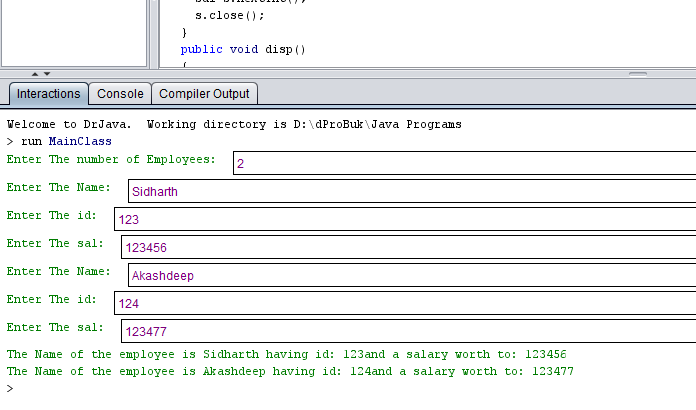
This program will help you in creating an simple Employee Management System using java language. In this program a class emp is used which has name, id and salary as data members. inside it there are two methods namely get() and disp() which work as getting user input and displaying the output. Scanner class is used as well. This program is an implementation of array of objects. Sample Output : The Code here: import java.util.*; class emp { public String name; public int id,sal; public void get() { Scanner s=new Scanner(System.in); System.out.print("Enter The Name: "); name=s.next(); System.out.print("Enter The id: "); id=s.nextInt(); System.out.print("Enter The sal: "); sal=s.nextInt(); s.close(); } public void disp() { System.out.println("The Name of the employee is "+name+" having id: "+id+"and a salary worth to: "+sal); } } class MainClass extends emp { publ...

Declaring variables and using them in JavaScript

Image
Javascript Variable JavaScript variables are containers for storing data values. JavaScript variables can hold numbers like 100, and text values like "John". The Assignment Operator Here, the equal sign (=) is an "assignment" operator, not an "equal to" operator. An example which  Create a variable, assign a value to it, and display it:- <html> <body> <script> <!--Using Variables--> var carName = "Swift"; alert(carName); </script> </body> </html> Result: Alert Showing the value of the variable carName Description: The Above program stores the string swift  in a variable carName  which later is displayed on a web browser through an alert

An Introduction to JavaScript , Hello World

JavaScript is the most popular scripting language in the world. This is a simple Hello world code snippet which displays hello world in the page. Basically there are four different ways of displaying message in a page using JavaScript window.alert(). document.write(). innerHTML. console.log() Simple Hello World Code Snippet: <html> <body> <script> window.alert("Hello World"); </script> </body> </html> Description The output is just a Alert window showing Hello World in it.